
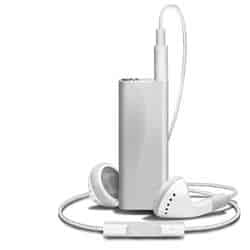
Learn how to create a photo realistic iPod Shuffle from scratch with Photoshop! This in depth tutorial is recommended for experienced Photoshop users. A PSD is included with this tutorial.
Preview of Final Results

Draw a Realistic iPod Shuffle Photoshop Tutorial
Step 1
Create New Document ( Ctrl+N ) 1600×1200 pixels at a resolution of 300 pixels/inch. Make new layer and change the name of the layer in “face” and create the same shape as I did using Pen tool ( P ) and fill (Shift +F5) the selection with #d8d8d8 color as in the image below .


Step 2
Make new layer and select ” face ” layer ( Ctrl+Click ) and brush ( 308px ) with black color and set the opacity to 10% .


Step 3
Make new layer and put the brush ( 75px ) on the left edge with black color and set the opacity to 84% .


Step 4
Now again put the brush on the left edge but make it little . Make new layer and put the brush ( 75px ) on the right edge with black color and set the opacity to 57% .


Step 5
Make new layer and make a path using PenTool ( P ) like in the picture and stroke path with #efefef and brush size ( 37px ) , erase Eraser Tool ( 71px ) a bit on the edge like in the picture.


Step 6
Select ” face ” layer ( Ctrl+Click ) an go to Filter – Noise – Add Noise and set noise in this mode : Amount 4% , Distribution Uniform .


Step 7
Make new layer and create the same shape as I did using Pentool ( P ) and Fill ( Shift + F5 ) selection with #dddddd color , make new layer and brush little with black an size brush 64px .


Step 8
Make new layer and make small hole with Line Tool ( U ) use the settings from the image, brush color black . Make new layer and make new path Pen Tool ( P ) like in the picture and Fill ( Shift + F5 ) selection with #74c93d color .


Step 9
Make new layer and brush ( 64px ) the left corner with black . Make new layer and brush ( 64px )the right corner with #989898 color .


Step 10
Make new layer an with black brush ( 64px ) little the right corner . Make new layer and make new selection with shape of the photo and Fill ( Shift+F5 ) selection with black . Apply a Gradient Overlay Layer Style (Right click on the layer – Blending Options>Gradient Overlay).
One response to “Draw a Realistic iPod Shuffle”
-

cant seem to find the downloadable PSD!

Leave a Reply