
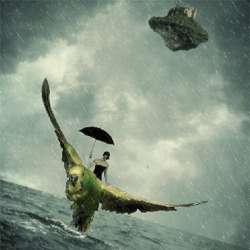
Learn how to create this surreal fantasy image of a lady on an epic budgie. You’ll learn how to combine and blend several stock photos, create a rain storm, then finish it off with a photo effect.
Preview of Final Results
![step8b_result[10]](https://cdn.photoshoptutorials.ws/images/stories/0b8645717ee8_131FF/step8b_result10.jpg?strip=all&webp=82&avif=82&w=1920 "step8b_result[10]")
Stormy Fantasy Scene Photoshop Tutorial
Tutorial Details
- Program: Adobe Photoshop CS2
- Difficulty: Easy
- Estimated Completion Time: 1 to 1.5 hours
Resources
- Stormy Sea by darkrose42 (Creative Commons License)
- Stock image 17 by CSnyder (Creative Commons License)
- island 1 by shelldevil (Creative Commons License)
- Castle by LilyStox (Creative Commons License)
- Budgie in flight 8 by greencheek (Creative Commons License)
- Persephone stock II by PhoenixFireStock (Creative Commons License)
- Digea rain brushes by Jelena Jovovic (Creative Commons License)
- decay 03 by louise-knightstock (Creative Commons License)
Step 1 – Create the Photoshop document
To begin, we will be creating a new image file, go to the Menu bar and click File > New, and then input the following values on their respective fields:
- Width: 2480 pixels
- Height: 3508 pixels
- Resolution: 300pixels/inch
- Color Mode: RGB Color; 8 bit
- Background Contents: Transparent
![step1_create_new[4]](https://cdn.photoshoptutorials.ws/images/stories/0b8645717ee8_131FF/step1_create_new4.jpg?strip=all&webp=82&avif=82&w=1920 "step1_create_new[4]")
Step 2 – Create the sea and the sky
On this step, we will be creating our stormy background. Open “Stormy Sea” by darkrose42. We will need the sea from this image, so activate the Rectangular Marquee tool (M).
![step2a_rectangular_marquee[4]](https://cdn.photoshoptutorials.ws/images/stories/0b8645717ee8_131FF/step2a_rectangular_marquee4.jpg?strip=all&webp=82&avif=82&w=1920 "step2a_rectangular_marquee[4]")
To use this tool simply, left-click on a point in the image and then drag your mouse to create a rectangular selection area on the image. Once done, dashed lines would appear around the area you selected. Now let’s move this sea to our canvas, to do that, activate the Move tool (V). Your mouse cursor will now change to an arrow with a cross with arrows in it (Windows move button). Drag the sea to our canvas and once there, rename this layer to “sea”. To rename a layer, simply double-click on the words: “layer 1″ to prompt a text box to appear. Once that appears, you may now rename the layer.
![step2b_rename_layer[4]](https://cdn.photoshoptutorials.ws/images/stories/0b8645717ee8_131FF/step2b_rename_layer4.jpg?strip=all&webp=82&avif=82&w=1920 "step2b_rename_layer[4]")
Now that the sea is on our canvas, we will now resize it. Activate the Transform tool (Ctrl/Cmd + T) and resize the sea as seen on the image below:

Next, let’s create the sky for this image. We will be using “stock image 17″ by CSnyder. So all we have to do once this image opens is transfer it to our canvas. Activate the Move tool (V) and drag it to our canvas. Once in the canvas, rename this layer to “sky”. Activate the Transform tool (Ctrl/Cmd + T) and right click on the image to bring out the contextual menu. Once that’s open click on Rotate 180′.

Then, activate the Transform tool again and resize the image, it should now be similar to the image below:
![step2e_result[4]](https://cdn.photoshoptutorials.ws/images/stories/0b8645717ee8_131FF/step2e_result4.jpg?strip=all&webp=82&avif=82&w=1920 "step2e_result[4]")
Notice that the sky is of a different hue compared to the sea? We don’t want that right? So let’s adjust the sky’s color balance to blend in with that of the sea. Make sure that the layer selected is the “sky” layer, after that go to Image > Adjustments > Color Balance. Once the Color Balance menu opens, input the following:
2 responses to “How to Create a Stormy Fantasy Scene in Photoshop”
-

OLD TUT
-
creative work i like it v mush


Leave a Reply