
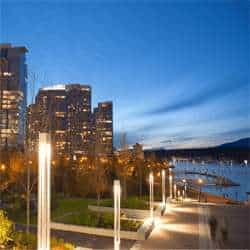
Create natural looking HDR tone mapped images in Photoshop with editable layers. This tutorial is an improved version of our Layered HDR Tone Mapping Photoshop tutorial from 2007. This new technique is capable of the same results but with a significantly smaller file size. We also added additional techniques to improve sharpness and contrast for a more realistic looking photo.
Preview of Final Results
Original image (middle exposure)
This is the original image of the middle exposure. For this tutorial, we used three images with a two stop difference in light.

Realistic setting
This new effect not seen in our previous HDR tone mapping tutorial creates an image similar to the middle exposure except it just has more dynamic range. This is a good technique you can use to improve the quality of your image without making it look like it was HDR tone mapped. In case you do not see the difference with the original middle exposure, examine the tsrees and mountain in the background and the lights on the floor. The realistically tone mapped image shows more detail than the original image but still retains similar contrast.
Rollover the image below to see the before and after effect.

Flattest setting
This is the flattest results this HDR tone mapping technique can create. This effect can be reduced by simply lowering the opacity of the layers. This technique works great with improving the looks of interior and real estate photos but can look a bit dull for landscape photos.
Rollover the image below to see the before and after effect.

Stock Photos
If you don’t have a set of HDR photos you’d like to use, feel free to use the images below. Click on the images below to download the full size image.


Photographing images for HDR tone mapping
After you try this Photoshop tutorial with our images, you may want to use your own. Here’s how you can photograph your images so that they can be tone mapped using this tutorial.

- You will need to shoot three exposures in the same position. To ensure that your camera does not move, put it on a tripod or a ledge so that it does not move while you shoot the three exposures. You can get away without using a tripod if your camera can shoot at 6fps or faster, you are using wide angle or image stabilized lens, and if the scene is bright enough to shoot at 1/250th of a second or faster. Simply enable high speed shooting mode on your camera. Keep your hands steady!
- Set your camera to aperture priority mode (Av). Using aperture priority mode is the safest way of creating a set of images for tone mapping. Avoid using shutter priority mode (Tv) as you can get halos and other artifacts in your image from the varying depth of field in your photo.
- Enable auto exposure bracketing (also known as AEB). If you are using a camera without this feature (ex. point and shoot cameras), skip this step. This feature is in almost every new DSLR camera and will automatically set the parameters to create three images of different exposures. This feature is usually found in your menu under AEB or Auto Exposure Bracketing. Refer to your camera manual if you do not know how to use this feature. For your first photos, set the bracketing to –2, 0, and +2. Some newer cameras let you go above two stops. You may try different bracketing settings depending on the dynamic range of your photo. Most DSLR have enough dynamic range that shooting at one stop increments is unnecessary.
- Set your cameras focus then switch to manual focus so that your camera does not refocus after taking each picture. Take three pictures and AEB will automatically create three different exposures for you.
HDR Tone Mapping Photoshop Tutorial
Step 1 – Importing the photos
Using Adobe Lightroom
Here is how you can import your photos through Adobe Lightroom. If you do not use Lightroom, you can skip this part. If you use Lightroom, this is a great way of working with HDR photos. Select the three exposure, right click, then choose Edit In > Open as Layers in Photoshop. The new tone mapped image will appear as a new image in Lightroom when you’re done. You can stack the four photos (3 exposures + 1 tone mapped image) for better organization.
2 responses to “HDR Tone Mapping with Layers in Photoshop”
-

Dats brilliant like it!
-
Nice Blog


Leave a Reply