

Photoshop brushes makes it easy to insert graphics into your artwork. Designers create the brushes for you so that you don’t have to go through the hassle of making your own graphics. PhotoshopTutorials.ws offers many high quality brushes that you may use for free. Here’s how to use our Photoshop brushes.
Step 1 – Download a brush
Download a Photoshop brush to your computer. You can find may brushes at brusheezy.com or from our Photoshop Brushes section. Be sure to check that the brush is compatible with your Photoshop version. For example, beside our download we state that our brushes are compatible with Photoshop 7+. This means that if you have Photoshop 7 or newer, you can use our brush.

Step 2 – Create a new document in Photoshop
Open Photoshop then create a new document or open one that you are working on.

Step 3 – Open the brushes panel then load the Photoshop brush
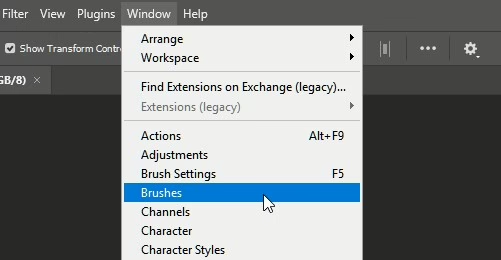
From the top menu, select Window > Brushes.
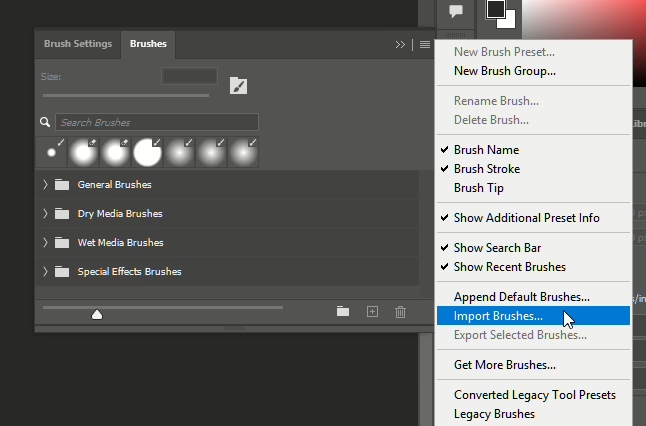
Click on the panel menu on the top-right then choose “Import Brushes”. Browse for the Photoshop brush file that you just downloaded then click OK.
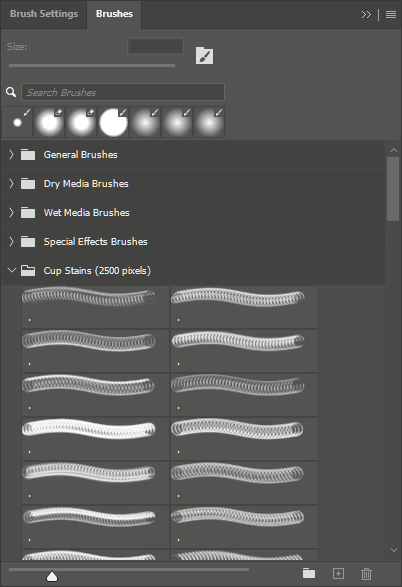
The brushes you just loaded will appear in the bottom of the list.
Step 4 – Use the brush
Congratulations! You just loaded a brush into Photoshop. Now you can select any brush from the list and use it in your document.

19 responses to “How to Install Photoshop Brushes”
-

The “Load Brushes” button in Photoshop CC is now “Import Brushes”. Just a heads up.
-
thanks alot
-
Thank you for these brushes and instructions on usage!
-
Thank you so much!
-
thanks for your brush
-
Thank You!
-
I love you!
-
Coooooooool
thank you
-
nice tutorial,thanks bro
-
I downloaded set Dried Blood Brushes in Photoshop CS6, extracted them and followed your steps. But I don’t see the brushes. Can you help me?
-
thank you bro :)
-
if we do not have the internet can we still get the brushes onto the photoshop program via a library / download site? I am doing a graphic design cours and need the smoke brushes but do not have internet at home
-
Don’t work ! When I press “Load Brushes” I can’t see any brushes …
-
it dont work. i using cs 7.
-
nice job thanks
-
Absolutely brilliant.
Thanks! -
Thanks!!!
-
Thanks very much.
-
thank you


Leave a Reply