
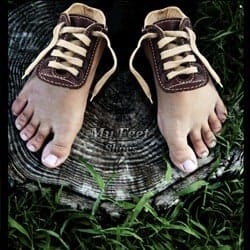
Learn how to create this photo manipulation of a feet shoe. This tutorial will show you basic photo manipulation techniques that you can use on your own projects. A PSD is included with this tutorial.
Preview of Final Results

Download the PSD
Feet Shoes.zip | 13 MB
Download from Website
Feet Shoe Photoshop Tutorial
Resources
Step 1
Let’s get started by set up settings pen tool as you seen in the image below

Step 2
Open Shoe picture and Select just the part that we need


Step 4
Right click then select “Make Selection”.

Set the radius to 0 pixels then click OK.

Step 5
Add new Mask to the Layer.


Step 6
Select Quick Mask Mode by Pressing on “Q” then start removing parts from shoe layer as you see in the image below.


Step 7
Press “Q” and Remove the parts you have Selected before

Step 8
Do the same thing as i did before in the second step


Step 9
Remove Mask from layer by dragging Mask layer to delete icon under the box layers


Step 10
Drag Shoe Layer into Feet Picture and and flip it a little bit


Step 11
Select Shoe Layer and Apply the settings Drop Shadow: Layer > Layer Style > Drop Shadow
- Color: #000000
- Blend Mode: Soft Light
- Opacity: 75%
- Angle: 120 without use Global Light
- Distance: 20px
- Spread: 0px
- Size: 5px

Step 12
Again Select Quick Mask Mode “Q” and hide part from the foot as you see in the image below


Step 13
Ok let’s give shoe some realistic by Select the top part from shoe then duplicate layer by pressing CTRL+J and Apply the settings layer Style as you see in the image below


Step 14
You will get this result

Step 15
Select Brush Tool with white color and Add some blur to the part we have selected before


Step 16
You did i great job, let’s go back to the original shoe picture, but in this step we’re going to Select just Shoe Lace from the picture

Step 17
Copy and past into Feet Picture then add new mask as usual and Select Brush Tool with a Black Color and start removing parts from shoe lace


Step 18
Do the same thing as we did before on the Left Side


Step 19
Let’s add shadow. Select part from shoe lace and change color to black then apply the settings Gaussian Blur and change opacity Layer to 30%


Step 20
Do the same thing on the left side


Step 31
Select Shoe layer and Go to Select > Modify > Contract and type in the following value “Contract by: 1 pixels”


Step 32
Inverse Layer by going to Select > Inverse Or Shift+CTRL+I then apply the settings Gaussian Blur as you see in the image below
3 responses to “How to Create Feet Shoes in Photoshop”
-

where is Tutorial ?????????????
-
hhh its great and fanny idea
-
Thank .
IT’s amazing for me
Thank


Leave a Reply