
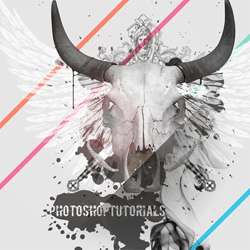
Create this simple poster created with layers of photos and shapes. In this Photoshop tutorial, you will learn how to use a combination of Photoshop brushes, images, and custom shapes to create this contemporary poster.
Preview of Final Result

What you will need
Architectural ornaments brush setA few splatter brushes
Design a Contemporary Poster Photoshop Tutorial
Step 1
Create a new document with dimensions; 1500 x 2000px. Now change the foreground color to a light grey, I used #e5e5e5. Go Edit>Fill and select foreground color. This will fill the background layer with a light grey.

Step 2
Now go here and copy the image into your document then scale it down until it looks like the image below. Select the magic wand tool and change the tolerance to 40. Now click outside the skull then hit Delete to get rid of the white background from the skull image, do the same for the other white bits like inside the eyes and the mouth. The last thing to do is to make sure the layer is selected then hit Shift+Ctrl+U, this will desaturate the layer.

Step 3
Next go and copy another image from here, this time of a sword. Place it into the document, first desaturate it in the same way that we did with the skull then scale and rotate the sword. Now get rid of the white background using the magic wand tool, this time with a tolerance of 10. Now duplicate this layer (Ctrl+J) then go Edit>Transform>Flip-Horizontal. Then move this layer so the swords form an X shape.

Step 4
In the layers panel select both the sword layers using Ctrl then hit Ctrl+E to merge these layers. Now we want the swords behind the skull, so just drag this layer down below the skull layer in the layers panel. I also increased the brightness of the layer by going Image>Adjustments>Brightness/Contrast and increasing the brightness a bit.

Step 5
Create a new layer between the skull layer and the swords layer then select the brush tool then in the main toolbar click the arrow next to the word brush then click the other arrow within the box that pops up and choose the architectural ornaments brush set. Change the foreground color to black then add a few of these into your image, I ended up only putting one in as you can see in the image below.
6 responses to “Design a Contemporary Poster”
-

wow
-
Thanks
-
:poop:
-
BRILLIANT
-
WOW….
-
Thank you :)


Leave a Reply